
Types of Mobile Apps: Native vs Hybrid vs Web Apps Explained
Mobile applications now run everything from small business operations to worldwide services. Those planning an app must know that there are different types of mobile apps, each built with separate technologies and serving distinct purposes:
Native apps
Hybrid apps
Web apps
Progressive web apps (PWAs)
Your technology choice directly shapes development cost, how fast the software runs, what users experience, and whether the application can grow alongside your business. These four factors should guide every technology decision that you take when building an app.
This guide covers real-world outcomes so you can match the right technology to your actual needs rather than guessing or following trends. Such practical knowledge saves both time and resources.
What Are the Main Types of Mobile Apps?
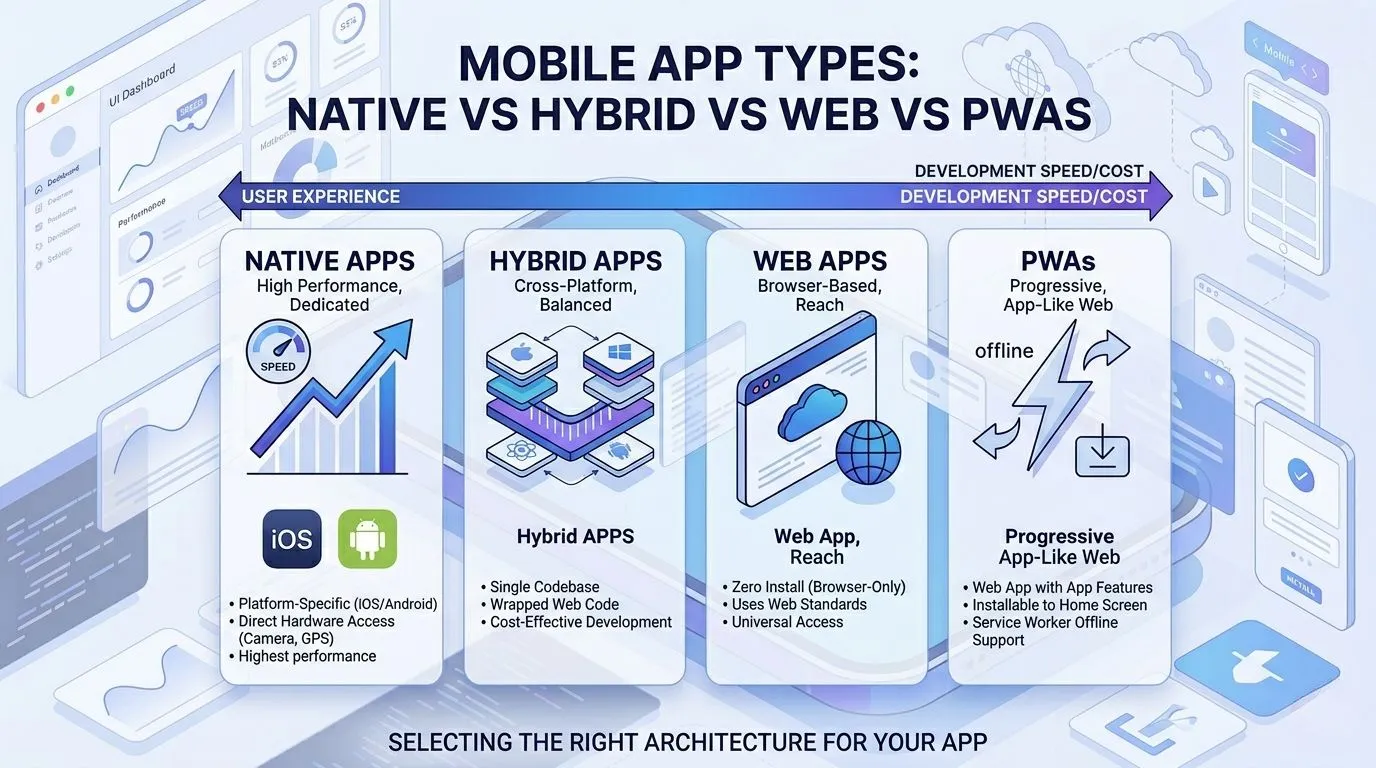
The four major mobile app types cover nearly every mobile software type in use today.
Native apps
This first type operates on a single platform such as iOS or Android. A 2025 study found that native development provides the highest performance available. The software integrates directly to device hardware, providing smooth functionality, user experience and direct communication that removes processing delays.
Hybrid apps
This type combines web-based code with a native technology. These frameworks are often called cross-platform apps because one codebase serves both iOS and Android. The same study as mentioned indicates that hybrid approaches reduce costs by a large margin due to a single team managing the entire codebase. Some responsiveness may decrease compared to native applications, but this trade-off often proves worthwhile for many projects.
Web apps
These applications work entirely inside a browser, i.e there is no installation step required and loads similarly to a standard website while offering app-like behavior. Such applications suit organizations seeking broad reach without going through app store approval processes.
Progressive Web Apps
This final type sits between web and native formats. These applications load immediately, support offline operation, and can send notifications. Evidence shows that PWAs improve energy efficiency on portable devices relative to native applications that run continuously in the background.
What Are Native Mobile Apps?
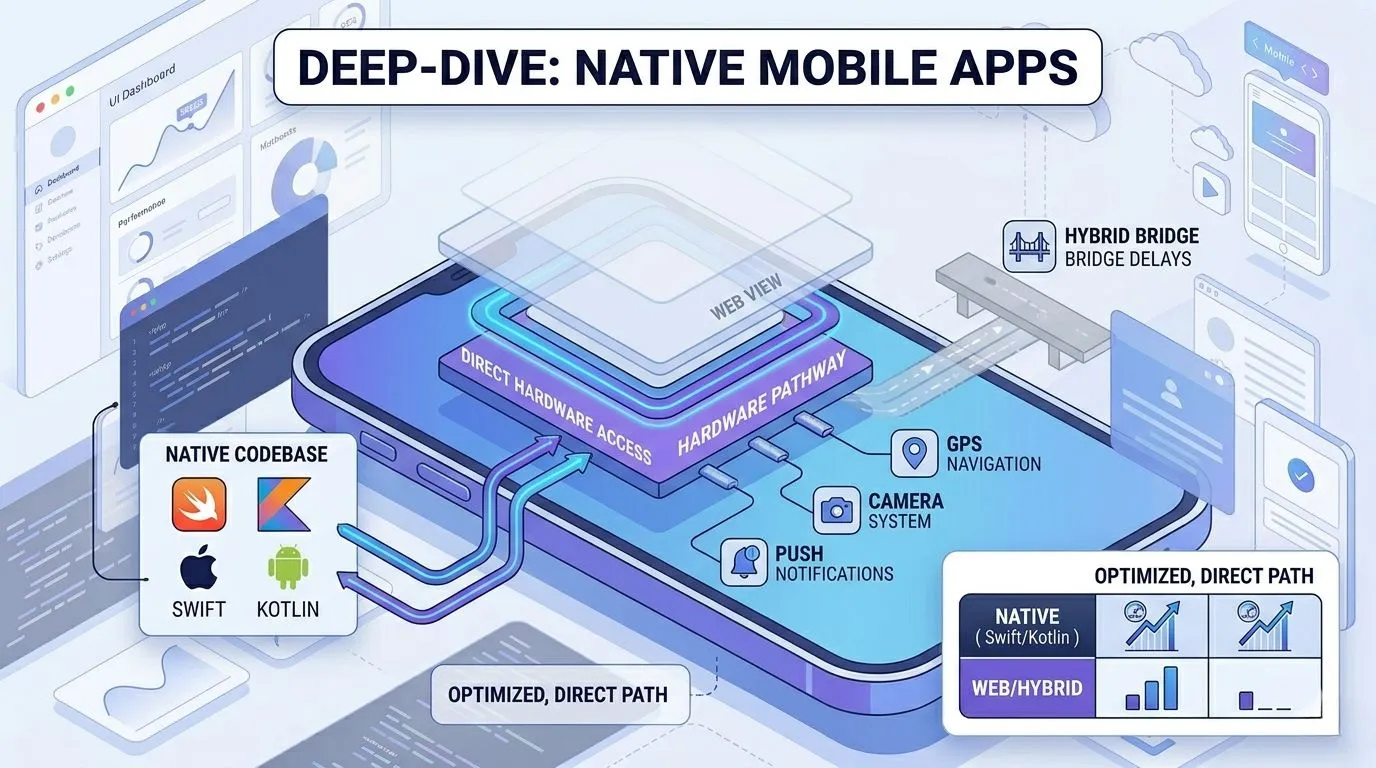
A native app is built specifically for a particular operating system at a time (iOS or Android). This exclusive setup explains why such software feels highly responsive. Market numbers from Verified Market Reports point out that Android holds roughly 55% of the distribution market while iOS follows at 40%. Together, both stores host more than three million applications, showcasing massive opportunities for business owners.
Programming Languages
The programming languages match each platform accordingly:
Swift for iOS development
Kotlin as a modern Android choice
Java for older Android projects
Objective-C for older iOS applications
Distribution Channels
Distribution happens through official channels only. These are:
Apple App Store for anything running iOS
Google Play Store for all Android software
Device Integration
Native apps stand out because of direct device integration including:
GPS for location tracking
Camera for photos and video
Push notifications for alerts
Sensors for motion and surrounding data
Such direct access to hardware explains why native apps respond so quickly to user commands.
Real-World Examples
WhatsApp handling encrypted messages without noticeable lag.
Spotify playing music files without breaks.
Uber showing a moving vehicle’s position on a map.
Each of these three depends on native code to deliver that speed. These applications demonstrate native development in everyday use.
Advantages of Native Apps
Best performance – native frameworks outperform all other approaches for one reason: software integrated directly into hardware. This direct communication eliminates the delays found in other methods.
Smooth user experience – each interaction feels immediate and predictable because the interface follows every UI and UX rule set by the platform. These platform-specific rules ensure users never feel lost.
Strong security – official app stores run review processes that catch harmful code before any distribution occurs. Such reviews add a layer of protection absent from many web-based options.
Full device feature access – GPS units, cameras, notification systems, and motion sensors work without the limits found inside web-based alternatives. This unrestricted access makes complex features possible.
Offline capabilities – content remains usable without any internet connection since all data lives directly on the device. These offline features keep an application running during network outages.
Scalability – growing an application to serve millions of additional users becomes easier when the underlying base handles device resources in an efficient manner. This efficiency supports steady growth over time.
Limitations of Native Apps
Higher development cost – building two separate versions for iOS and Android requires paying two separate teams or finding developers who have two-platform knowledge. These costs can exceed what smaller budgets allow.
Separate codebases for iOS and Android – each operating system demands its own set of project files, an arrangement that doubles the workload whenever features undergo changes. This separation forces teams to repeat nearly every task.
Longer development time – writing, testing, and debugging two separate applications stretches the project schedule by a large margin compared to single-codebase alternatives. That extended timeline delays product launches and revenue generation.
What Are Hybrid Mobile Apps?
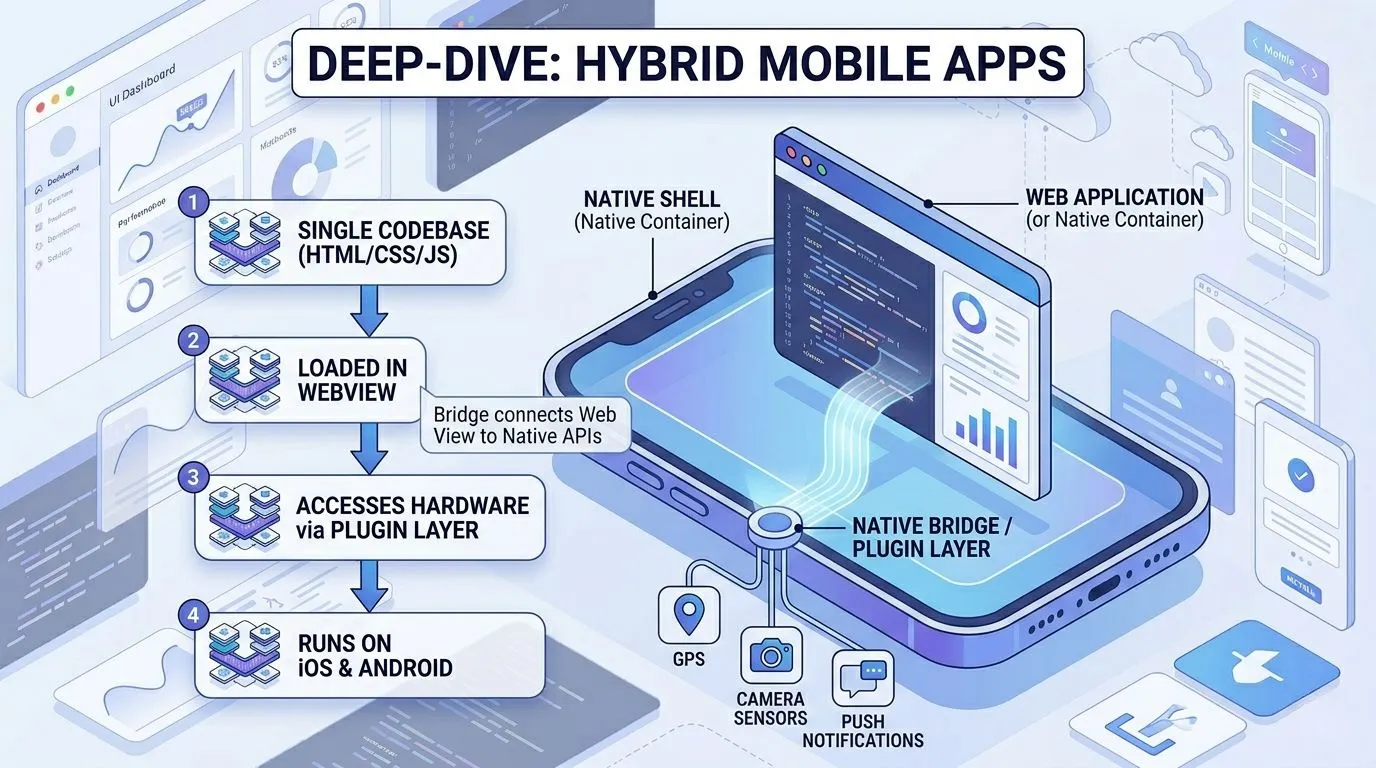
A hybrid application merges web technologies with native containers. One can understand this combination as a website placed inside a native shell that installs from a store just like any other software. This structure explains why hybrid apps feel familiar to web developers.
Core Building Technologies
HTML for page structure
CSS for visual styling
JavaScript for interactive behavior
Popular Frameworks
Several development frameworks have made this approach practical:
Flutter – Google’s offering using the Dart language
React Native – Facebook’s library built around JavaScript
Ionic – A framework centered on standard web technologies
Xamarin – Microsoft’s solution using C#
Single Codebase Deployment
The main benefit of hybrid development is its single codebase deployment across platforms. During development, you only need a single team that writes the code once, after which that same code runs on both iOS and Android. The 2025 study confirms this approach lowers costs and makes ongoing upkeep simpler. Yet the same research warns that hybrid applications may show limited performance due to reliance on WebView for interface display.
Advantages of Hybrid Apps
Faster development – writing one codebase instead of two cuts project timelines by several weeks or months. This speed matters when deadlines are tight.
Lower cost – one team means a single payroll, an arrangement that works well for smaller budgets. These savings can fund other parts of a project.
Shared codebase – every feature written once works everywhere, thereby removing duplicate work. This shared foundation prevents teams from solving the same problem twice.
Easier maintenance – fixing a bug or adding a feature happens in one location rather than across two separate projects. This simplicity reduces the chance of version mismatches.
Hybrid App Pitfalls (Rarely Discussed)
Plugin dependency – accessing device features such as cameras or GPS requires outside plugins that may fail to receive regular updates. These dependencies introduce external risk into any project.
UI inconsistencies – what appears correct on iOS may look misaligned on Android because each platform handles styling through different rules. Such visual mismatches can frustrate users who switch between devices.
Performance lag in heavy apps – findings in a study showed that architecture choices (bridge versus JSI) directly affect how smoothly an application runs when handling complex operations. These performance differences become noticeable in graphics-heavy or data-intensive applications.
Debugging complexity – tracing an error through web code, a native wrapper, and plugin layers creates more locations where problems may stay hidden compared to a purely native application. This added complexity extends the time needed to resolve issues.
What Are Web Apps?
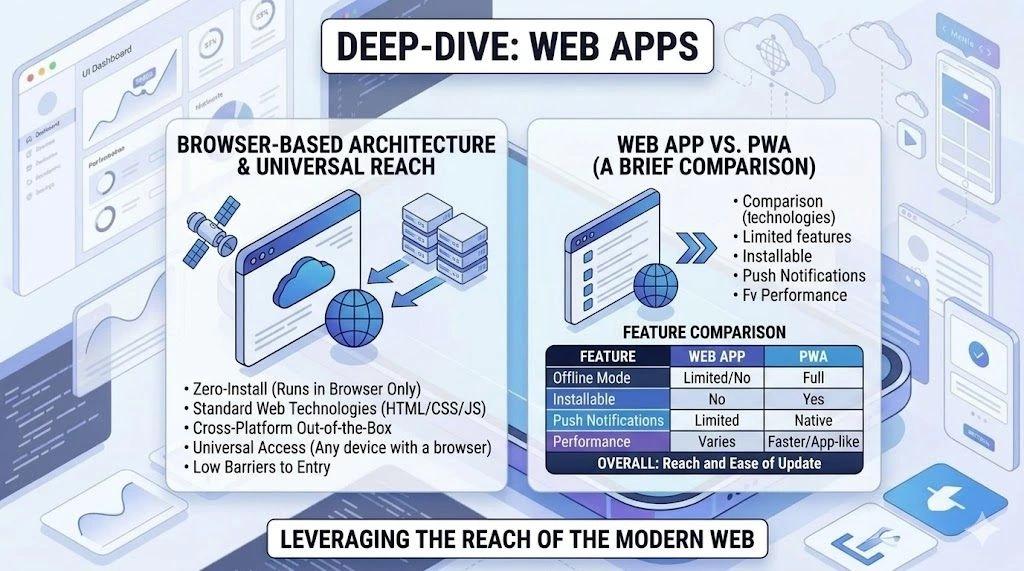
A web application runs inside a browser in which a person types a web address and then the software loads much like a typical website while offering behavior similar to installed applications. This browser-based nature distinguishes web apps from software that requires downloading.
Examples of Popular Web Apps
Google Docs – word processing that saves automatically to remote servers
Trello – project management boards accessible from any browser
Notion web interface – note-taking and collaboration without separate desktop software
Technologies Used
The technologies powering these applications include HTML for page structure, CSS for visual styling, JavaScript for interactive elements, and modern web frameworks that make development more efficient.
Advantages of Web Apps
No installation required – users reach the application immediately by visiting a web address, a process that removes the friction of downloading from stores. This accessibility lowers the barrier to trying new software.
Lower development cost – a single codebase works across devices without requiring separate teams for iOS and Android. Those savings can fund other parts of a project.
Easy updates – changes go to the server one time after which every user sees the new version without taking any action. This simplicity eliminates the patch management typical of installed software.
Cross-device compatibility – the same application runs on laptop computers, tablet devices, and mobile phones through any current browser. Such flexibility matters for users who switch between devices throughout the day.
Limitations of Web Apps
Limited hardware access – device features such as cameras, location sensors, and notification systems remain restricted compared to native applications. These restrictions prevent web apps from matching native functionality in many scenarios.
Internet dependency – web applications require stable network connections, with measured performance dropping by a large margin on slower 3G networks. This dependency creates problems for users in areas with poor coverage.
Weaker performance compared to native apps – JavaScript-based web frameworks experience bridge-related delays, while native applications deliver faster loading times and lower memory use. These performance differences become noticeable when applications handle complex tasks or large amounts of data.
What Are Progressive Web Apps (PWAs)?
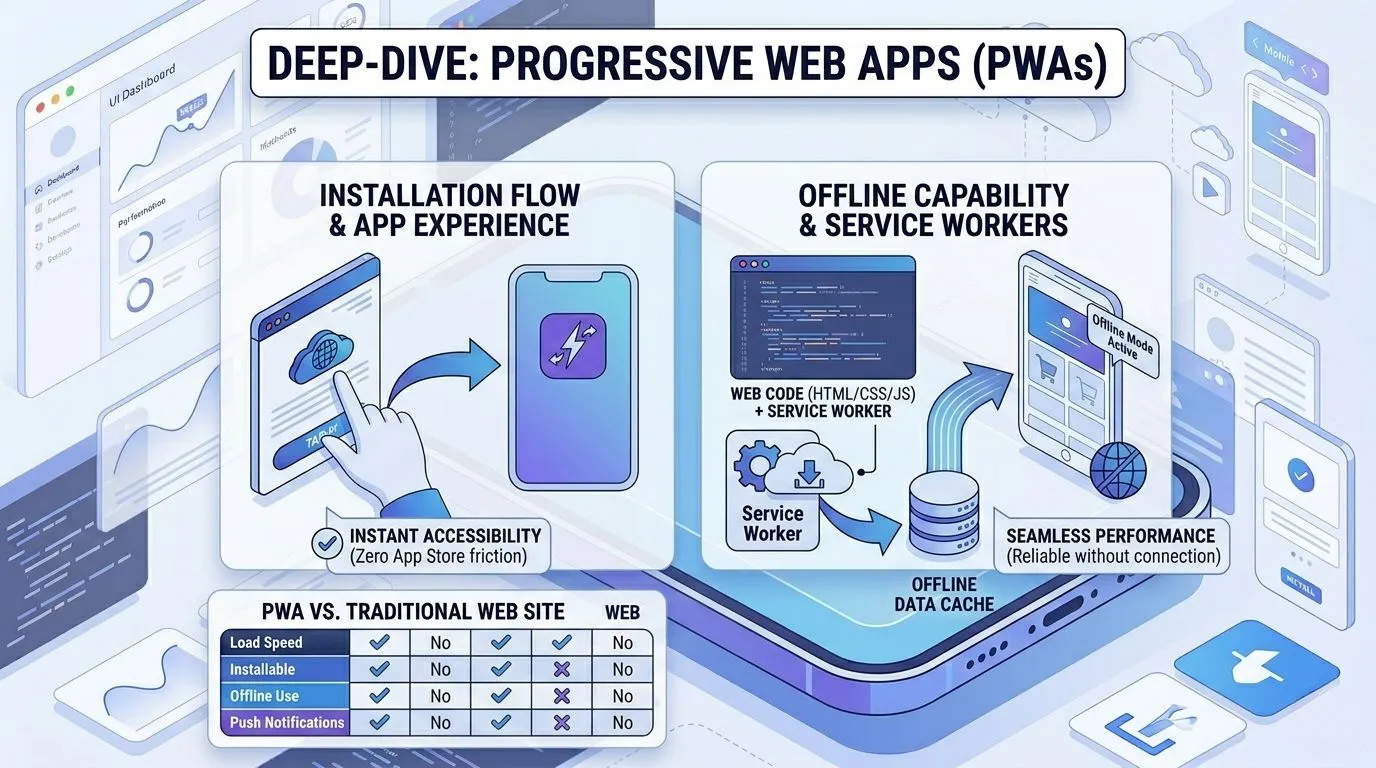
This technology merges web accessibility with mobile app features while bypassing the need for store approval. Such a hybrid nature explains why PWAs have gained attention from businesses large and small.
Features
Offline functionality – service workers store content on the local device so users continue working without any internet connection. This capability proves useful in areas with spotty coverage.
Push notifications – messages reach users even when the browser window remains closed. These notifications keep people engaged without requiring the app to stay open.
Installable home screen icon – visitors add the application to their device with a single tap, a process that avoids app stores entirely. This installation method removes the friction of searching and downloading.
Faster loading – Research shows PWAs can reduce loading times by up to 80% when measured against traditional mobile websites. That speed improvement directly affects user retention.
Company Adoption
Some companies who have adopted PWAs:
Twitter – Twitter Lite demonstrates how a well-executed PWA can improve user engagement while reducing data usage.
Starbucks – Built a PWA that lets customers browse menu items and customize drink orders even when the device lacks an active connection. This offline ordering feature addresses a real customer pain point.
Pinterest – Redesigned its mobile web experience as a PWA, showing that this approach can drive user engagement and conversions.
Such outcomes explain why major brands continue investing in this approach.
Limitations of PWAs
There are several drawbacks that rarely receive attention in mainstream discussions. Being aware of these issues prevents unrealistic expectations.
Browser dependency – there is no equal support across different browsers. For instance, Android provides strong PWA capabilities that Apple does not offer. This limitation affects offline performance and notification delivery specifically on iOS devices. Developers must therefore test extensively on both platforms.
Limited iOS support features – A review notes that Apple's platform offers restricted access to certain native APIs as background processes face tighter controls when compared to Android. These restrictions mean some PWA features work differently or not at all on iPhones.
Restricted hardware access – PWAs depend on web APIs that may fail to support advanced device features like Bluetooth connections, NFC payments, and fingerprint scanning. Such limitations make PWAs unsuitable for applications requiring deep hardware integration.
Lower performance compared to native apps – although PWAs load faster than traditional websites, they cannot match the responsiveness of fully native applications. Thus, they require regular upkeep to prevent security weaknesses which adds to ongoing operational costs.
Native vs Hybrid vs Web Apps: Key Differences
The table below shows differences in how each type of mobile application performs across practical measures. Your development will typically follow a structured Mobile App Development Process that includes planning, design, development, testing, and deployment.
| Factor | Native Apps | Hybrid Apps | Web Apps | PWAs |
|---|---|---|---|---|
| Installation | App store download required | App store download required | No installation, browser only | Home screen installation, no store |
| Mobile app performance | ★★★★★ (direct hardware access) | ★★★☆☆ (WebView limits) | ★★☆☆☆ (browser-bound) | ★★★☆☆ (service workers help) |
| Development cost | Highest (two teams needed) | Medium (one codebase suffices) | Lowest (web standards apply) | Low (one codebase works) |
| Codebase | Separate for iOS and Android | Single codebase | Single codebase | Single codebase |
| Device access | Full (GPS, camera, sensors) | Partial (plugin-reliant) | Very limited | Partial (API-dependent) |
| Offline support | Full | Limited | None | Yes (service workers enable this) |
| Maintenance | High (two versions to handle) | Lower (one version to track) | Low (server updates suffice) | Low (server updates suffice) |
| Security | Store review plus OS-level controls | Store review plus plugin weaknesses | HTTPS dependent | HTTPS plus service worker upkeep |
| Best for | Gaming, fintech, hardware-intensive apps | Startups, MVPs, budget-conscious projects | SaaS platforms, content sites, blogs | E-commerce, news sites, offline-first apps |
Your team should line up technical selection with user experience and expectations rather than following what others in their industry do. This principle applies regardless of whether the project serves dozens or millions of users.
How to Choose the Right App Type for Your Business
Below is a decision flowchart that walks you through basic questions about budget and feature needs. Follow the path that matches your limits.
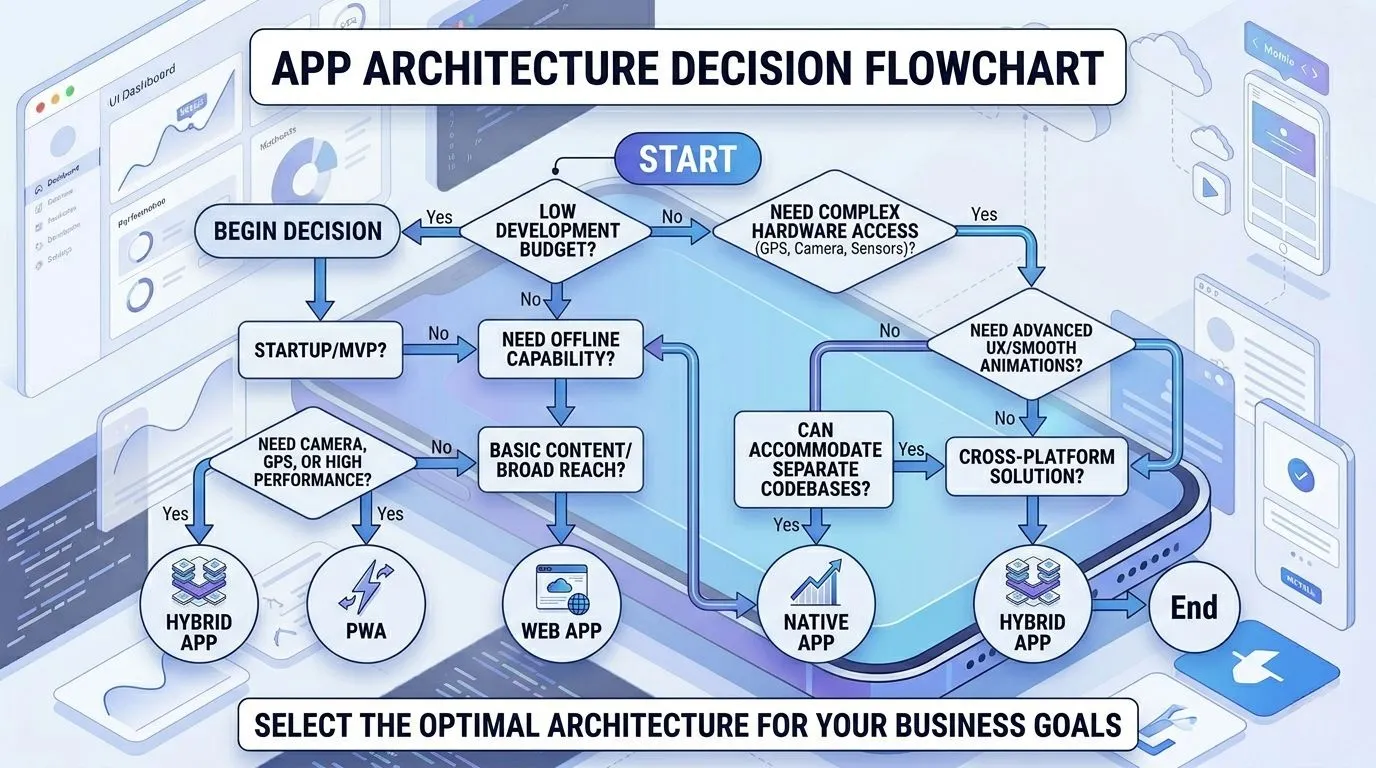
Simple decision flow:
Question 1: What is your budget?
Low → Web app or Hybrid
High → Continue to Question 2
Question 2: Do you need a camera, GPS, or smooth animations?
Yes → Native app
No → Hybrid or PWA
Revisit the choice if circumstances change during the planning phase because early changes cost less than late corrections. For complex projects, consult experienced mobile app developers who have delivered similar work.
Their experience prevents common mistakes. You can also study a Mobile App Development Guide to understand what each approach requires in terms of team, timeline, and technical skills.
Emerging Trends in Mobile App Development
The mobile development landscape continues to shift as new technologies mature. Below are the key trends based on recent research and market data.
Rapid Improvements in Cross-Platform Frameworks
According to this study:
Each of these frameworks now comes close to native performance standards
Developers reach both iOS and Android audiences through a single codebase
Cross-platform tools shape development paths by way of steady innovation
Growth of Progressive Web Apps
Market data tracking PWA growth across sectors mentions:
Businesses move toward PWAs due to lower development costs
Better user engagement results when compared to traditional approaches
Adoption rates keep climbing across multiple industries
Low-Code Mobile Development Platforms
According to Statifacts, organizations adopt low-code platforms for several reasons:
Developer shortages find a workable solution through low-code adoption
Time-to-market reduces by a large amount when teams use these builders
Cloud-based deployments lead this type by a wide margin
Rise of AI-Powered Mobile Apps
Sensor Tower data reveals notable growth patterns:
Generative AI applications recorded significant download increases throughout 2025
Time spent inside these apps rose year over year by a large measure
AI Assistants lead the trend across major mobile storefronts
From Four Mobile App Types to One Choice
When selecting the most suitable type of mobile app, do an honest review of your specific situation. This is because no single app type outperforms all others across every measurement. So, each project you do will require its own evaluation.
Key factors to weigh include:
Business goals – whether customer engagement, revenue generation, or internal operations drive the project
Budget – smaller spending amounts point toward web or hybrid solutions
Performance needs – smooth animations and hardware access require native development
Scalability – native applications handle growth with fewer structural changes
Before committing resources, experienced mobile app developers can examine your requirements and suggest a suitable path forward. Their insight prevents expensive changes at later stages.
This decision you take will not only determine launch expenses but also long-term maintenance of the app and how often updates can be released. These long-term factors often prove more significant than initial development costs.
Frequently Asked Questions
Q: What are the different types of mobile apps?
Four main types are native, hybrid, web, and progressive web apps. These four types cover nearly every mobile software option available today.
Q: Which type of mobile app is best for startups?
Hybrid or web applications usually serve new companies better. Either approach lowers development cost by a large margin, which lets startups test product ideas without funding two separate codebases or waiting through extended store approval steps. This flexibility makes hybrid and web options attractive for new teams.
Q: Are hybrid apps slower than native apps?
In most cases, yes. Hybrid apps face slowdowns when handling operations that involve heavy graphics but work alright for standard business applications that lack complex animations. Such performance gaps matter only for graphics-intensive projects.
Q: What is a progressive web app (PWA)?
A PWA works as a website that behaves like an installed application. This app type offers lower development cost along with stronger user engagement when measured against traditional mobile websites. Browser support, however, varies across different devices and operating systems. This inconsistency remains the main drawback for teams considering PWAs.
Q: Can web apps replace native apps?
For many use cases, the answer is yes. The answer is no for hardware-heavy tasks such as gaming, augmented reality, or heavy video processing. When comparing, web apps work best for content-focused applications whereas applications needing deeper hardware integration like camera or GPS and greater UI and UX requirements benefit from native development.