
Web App vs Mobile App: Key Differences You Need to Know
When you launch a digital product or service, you will face a critical decision early on: whether the product would be released via a web app versus a mobile app.
For someone without programming experience, both paths look similar at first glance. Each one lets a user log in, browse content, complete a transaction, or store preferences.
Their technical differences however give rise to practical concerns for your digital service. These include how often users will return, whether they need access without an internet connection, and if the product relies on phone sensors or alert systems.
This article presents the difference between web app and mobile app so you can simply match the right choice to your given situation, budget, or audience behavior.
What Is a Web App?
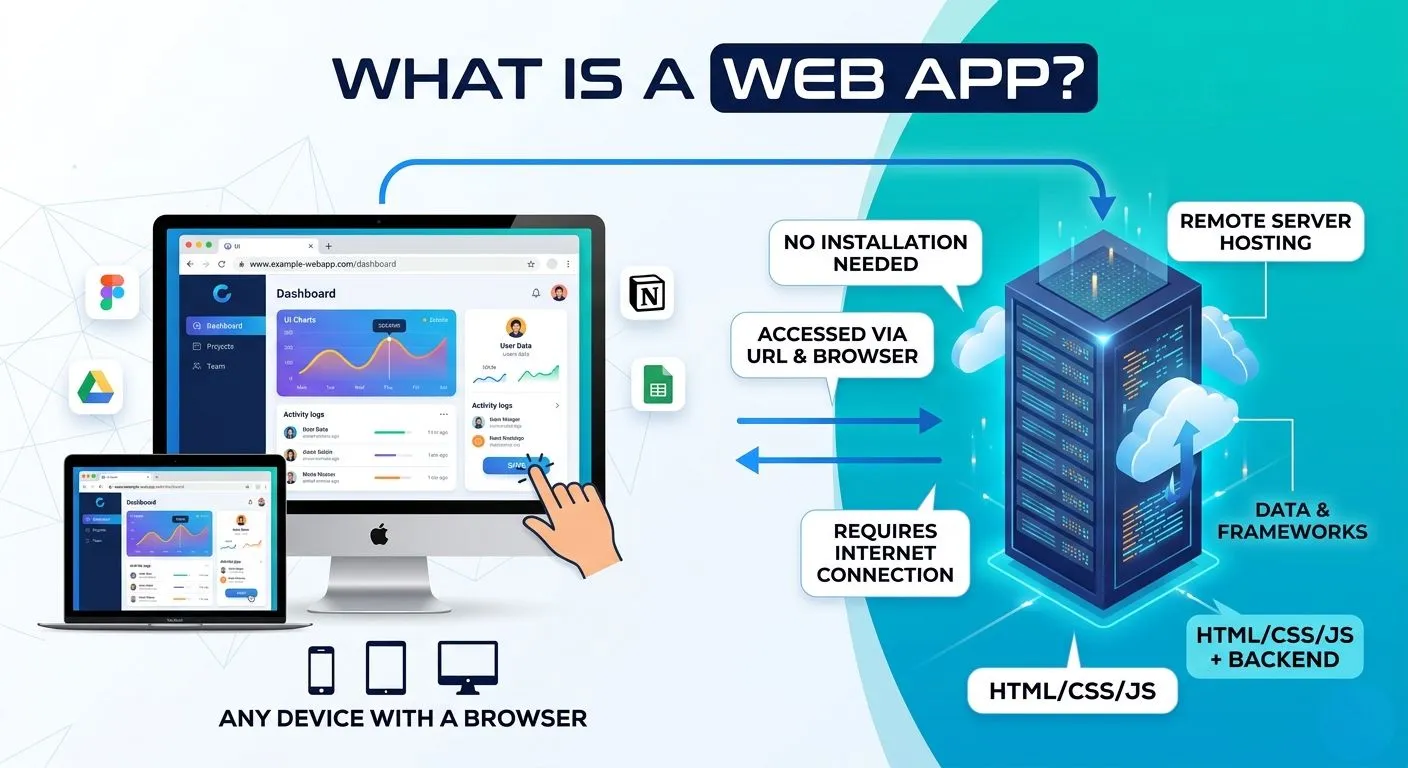
A web app gets hosted by a remote server and reaches the user through a web browser using a URL. There is no need for installation and store approval that may delay launch. This means anyone who has an internet connection and a browser can start using such a product right away.
Devices that run web apps:
Smartphones
Laptops
Tablets
Desktops
Real-world examples:
Figma
Notion
Google Sheets
Airtable
Monday.com
Looking at the technical side, web apps depend on several common building pieces: HTML, CSS, JavaScript, and various backend frameworks.
The user experience given by these products closely matches what traditional installed software provides, but they need third party code to function (the server).
The Major Drawback
Findings presented show that significant third-party code creates slowdowns across many web apps. Such slowdowns may affect people using lower-end devices or limited bandwidth connections. This server-based setup produces specific strengths and limits, as the following subsections explain.
Advantages of Web Apps
Several clear benefits explain why many teams begin their work on web apps. Making a choice between mobile app vs web app often comes down to these accessibility factors and distribution traits.
Instant accessibility – users open a browser, type a URL, and start working. No installation steps reduce friction in the user flow and provide rising adoption rates.
Cross-device compatibility – one version runs across phones, tablets, laptops, and desktop machines without needing any changes. This flexibility saves significant development time.
Lower development costs compared to native alternatives. A single set of code serves all operating systems at once, a strategy used by many new founders.
Faster time to market, especially for minimum viable products that need user feedback as quickly as possible. Such speed allows teams to test ideas before committing larger budgets.
Simpler updates happen on the server side. Developers put out changes one time, and every user sees the new version right after that deployment.
No app store approval process removes waiting periods of days or weeks for a third party to review the finished product. This delay can kill early momentum for new startups with time constraints.
SEO visibility allows potential users to find the application through standard search engine result pages. This discovery channel does not exist for most installed software.
Easy sharing occurs through a simple web link. Anyone receiving the web address can forward it to another person without extra steps, giving way for growth.
Limitations of Web Apps
Understanding the limits found in a web application vs mobile application prevents costly mistakes during later stages of building.
Limited access to device hardware – environmental sensors, Bluetooth radios, and near-field communication chips are often out of reach. These gaps make certain product categories impossible to build as web apps.
Weaker offline functionality – most web apps need an active connection to work efficiently. This creates problems for users who travel or work in areas with spotty service.
Performance limits – graphics-heavy applications like games or three-dimensional modeling tools suffer the most. Research confirms that web apps struggle under low-bandwidth or high-delay conditions when compared to locally stored assets. Such struggles frustrate users expecting smooth interactions.
Browser compatibility challenges – testing must occur across multiple rendering engines including Chromium, WebKit, and Gecko. These tests add time and expense to each development cycle.
Lower user retention compared to mobile apps – icons for web apps do not stay visible on device home screens. This visibility gap affects how often people return to the product.
Limited push notification abilities – some platforms restrict available re-engagement methods. For this reason, marketing teams often prefer native options.
Dependence on internet connectivity – users who lack reliable service cannot reach the product at all, a limitation which excludes entire customer segments.
Security weaknesses if poorly set up – misconfigured servers or broken access controls expose user data. This list releases broken access control as the number one risk facing web applications today. Security misconfiguration follows directly behind as the second most critical threat. These risks require ongoing attention from the founding team.
What Is a Mobile App?
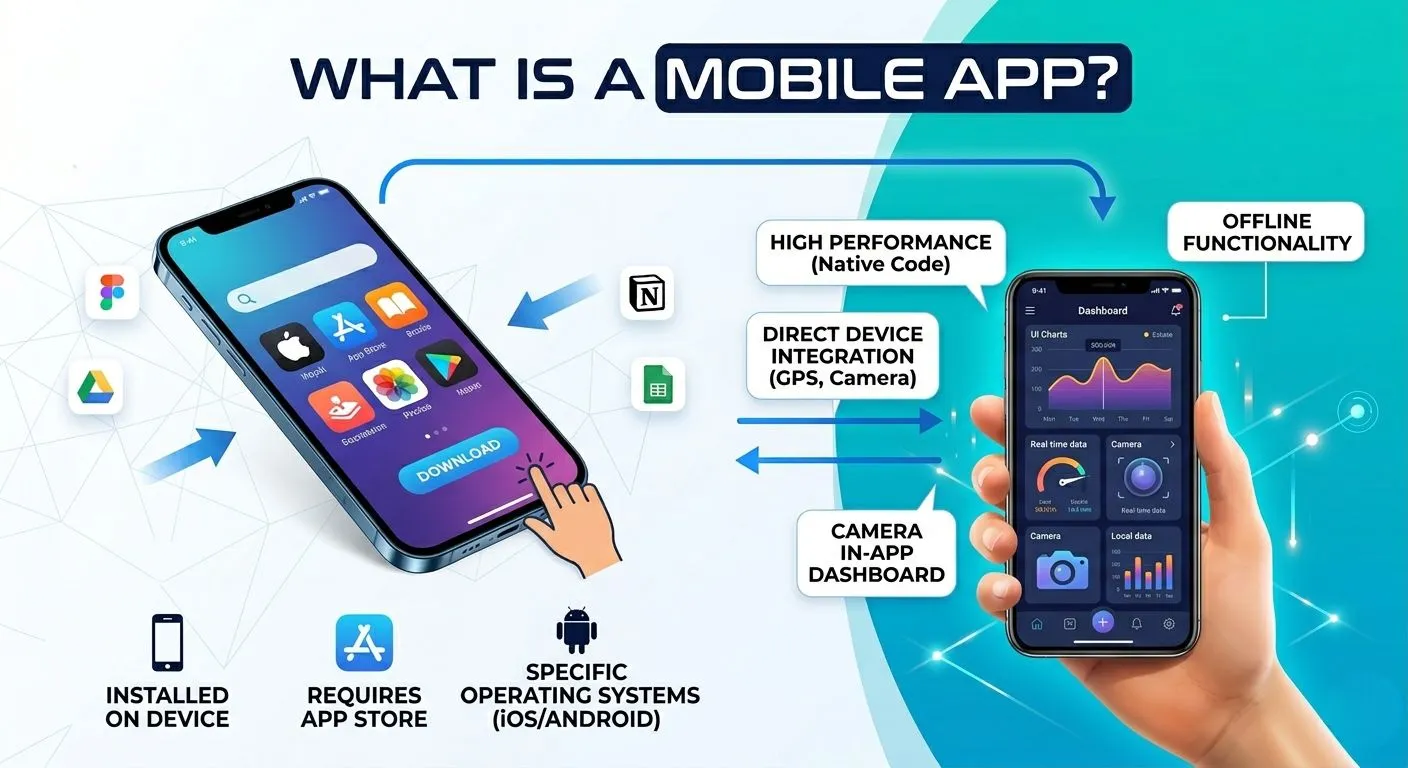
A mobile application gets installed by the user on a mobile or tablet through the app store. This direct installation sets mobile apps apart from web-based alternatives.
These applications are built for specific operating systems. iOS for iPhones and Android for devices from Samsung, Google, and others. Each version has a different technical language and therefore different development budgets.
Familiar names in this category:
TikTok
Snapchat
Duolingo
Strava
Telegram
The worldwide market for mobile apps reached 298.40 billion dollars in 2025, as documented by a March 2026 industry report. Projections indicate that figure will rise to 1,017.18 billion dollars by 2034.
There are several reasons for their growth: increasing numbers of smartphone users, rise of e-commerce, and subscription-based pricing models. Unlike their web counterparts, these products depend on device capabilities and mobile-specific user habits.
Advantages of Mobile Apps
Choosing a mobile app or web app changes how users experience the product from the first tap. The benefits of mobile apps fall into performance, engagement, and security categories.
High performance – the code runs directly on the device with no network round trips slowing down basic interactions. This responsiveness increases user retention.
Smooth and responsive user experience – feels native to the operating system as the app is integrated in mobile hardware providing smooth transitions, gestures, and animations that keep users satisfied.
Offline functionality – data stored locally allows continued use when internet access disappears. This capability proves valuable for travelers or commuters.
Push notifications – mobile apps provide the benefit of push notifications to your target audience. This means greater access to users and improved marketing outcomes.
Better personalization – usage patterns, location history, and local storage enable customized content delivery, an advantage that drives repeat visits.
Enhanced security – the National Institute of Standards and Technology now formally recognizes mobile apps as capable of meeting government-grade identity proofing requirements through updated federal guidelines. This recognition matters for industries handling sensitive data.
Higher engagement rates – installed icons remain visible on home screens making users return more often as a result.
Limitations of Mobile Apps
The drawbacks of mobile apps affect critical business decisions like budget, timeline, and user reach.
Higher development costs – building for two platforms costs more money than building for one. This financial reality shapes many early decisions.
Separate development for iOS and Android – each operating system demands its own codebase unless cross-platform tools enter the picture, a disadvantage that doubles testing efforts.
App store approval processes – a third party reviews every submission before users can download it. These delays can postpone launch dates by days or weeks.
Download requirement – users must download the app before using it. This extra step alone turns away a portion of potential visitors. It is for this reason that conversion rates from website visit to app install remain low.
Ongoing OS compatibility updates – Apple and Google release new operating system versions each year which risks breaking existing features, a process that needs endless maintenance.
Phone hardware limits – peer-reviewed research on heavy tasks like face recognition shows that when a mobile phone offloads the work to an edge device, the processing time is significantly lower and the phone’s CPU usage and battery drain are reduced compared to running the task entirely on the phone. This happens because phones have limited CPU power, memory, and cooling, while edge devices can handle intensive AI workloads more efficiently.
Device storage space – photos, messages, and other applications compete for limited room on every phone. This competition leads some users to delete apps when space runs low.
Marketing challenges – getting someone to tap “download” demands advertising spend, app store optimization, or word of mouth and none of this comes free. The app development cost represents only the beginning of the total investment. Marketing expenses often exceed development budgets over time.
Key Differences: Web Apps vs Mobile Apps
The table below lays out the core differences across nine factors, from installation to user engagement. Beyond that comparison, three specific areas that affect businesses — payment processing, customer acquisition costs, and return on investment for B2B products — have also been looked at.
Key Differences: Web Apps vs Mobile Apps
| Factor | Web Apps | Mobile Apps |
|---|---|---|
| Installation | No installation required | Installed from app stores |
| Accessibility | Any browser | Device-specific |
| Performance | Moderate | High |
| Offline Access | Limited | Strong |
| Development Cost | Lower | Higher |
| Maintenance | Easier | More complex |
| Device Features | Limited | Full access |
| User Engagement | Lower | Higher |
| Updates | Instant | Requires updates |
Payment Processing Differences
| Aspect | Web Apps | Mobile Apps |
|---|---|---|
| Fee structure | Small base fee plus tiny flat rate | Double-digit percentage per transaction |
| Impact on revenue | Keep more revenue from each customer | Give up large portion of every sale |
| Long-term effect | Adds up across thousands of transactions | Significantly reduces profit margins |
Customer Acquisition Costs
| Aspect | Web Apps | Mobile Apps |
|---|---|---|
| Upfront cost per user | None | Real money per download |
| Discovery method | Search engines and direct links | Ongoing ad spending required |
| Budget impact | Stretch every dollar further | Higher spending before revenue arrives |
| Best for | Founders with limited marketing funds | Brands with larger acquisition budgets |
Return on Investment for B2B Products
| Aspect | Web Apps | Mobile Apps |
|---|---|---|
| Profit per marketing dollar | Healthier return | Lower return |
| Performance relative to each other | Consistently outperforms | Underperforms compared to web |
| Relevance for progressive web apps vs mobile apps | Stronger financial case | Weaker financial case |
Key Developments: The middle ground PWAs (progressive web apps) are no longer experimental. They now work as a standard option for teams seeking advantages from both approaches: web and mobile apps without fully committing to either one.
For many startups, a PWA delivers native-like experiences at web-like costs. However, native mobile apps still offer better stability for everyday functions. But for many common use cases, users cannot tell the difference anymore.
This reality shapes how founders should think about their platform choices today. Before deciding, understanding the different types of mobile apps will help you make your choice confidently.
When Should You Build a Web App?
Not every product needs a mobile app from day one. In fact, most successful software companies start somewhere simpler like building a web app first.
Enable Idea Validation
A web app fits situations where the main goal is testing a concept without risking too much money upfront, especially for startups validating profitable app ideas. Research on platform startups shows that keeping users involved throughout product development helps drive faster growth.
Key growth factors include platform usability, ongoing customer involvement, and the founding team’s mindset.
Let the Team Launch Faster
Thanks to no-code and low-code tools, non-technical founders can do new software launches and build much faster. However, many startups still fail because they skip proper validation with real users.
Data shows that about 47% of startups fail within the first 18 months, and 75% fail within 3 years, often because they run out of money or build the wrong product. Web apps allow founders to launch faster, collect feedback, and make changes without waiting for app store reviews.
When Should You Build a Mobile App?
A mobile app requires more money, time, and ongoing maintenance. But for certain products, that extra investment pays off.
Performance Cannot Be Compromised
For example in graphics-heavy operations, real-time camera processing, and biometric login that need hardware integration for optimal function. Businesses often choose custom mobile app development for better control and performance.
Industry guidance confirms that native applications run smoother and faster for games and media products (unmatched UI design) while offering full device integration.
User Experience Favors Mobile
Mobile apps allow unbeatable platform-specific customization in UX that web browsers cannot match, for instance through push alerts and hardware access.
Greater Security
Fitness tracking, location check-ins, and in-app purchases all work more reliably on a phone than inside a browser window. Also customers are more comfortable with app store payments who might otherwise hesitate before typing payment information on a mobile website.
Can a Web App Become a Mobile App Later?
Many successful startups like Slack, Notion, and Dropbox started on the web and added mobile later. This shows that early-stage teams can often move faster and save money by launching a responsive web app first, then adding a cross-platform mobile version, and only building full native apps after they have real users and funding.
Large scale development firms do not prescribe a fixed “web-first” rule, but they do emphasize starting small, learning from users, and evolving the product, which fits well with this web-to-mobile approach.
When you transition from a web app to a mobile app, the developer team follows a step-by-step Mobile App Development Process to ensure the success of your digital product.
Development Cost: Web App vs Mobile App
The table below compares development costs across web and mobile applications. These cost differences will help you allocate budgets effectively and avoid unexpected expenses.
| Category | Web Apps | Mobile Apps |
|---|---|---|
| Base cost range | $10,000 – $100,000+ | $25,000 – $250,000+ |
| Medium complexity | $30,000 – $100,000 | $50,000 – $120,000 (single platform) $100,000 – $180,000 (dual platform) |
| High complexity / Enterprise | $100,000 – $250,000+ | $120,000 – $250,000+ (single platform) $180,000 – $350,000+ (dual platform, complex) |
| Cross-platform apps | Not applicable | $20,000 – $150,000+ |
| Annual maintenance | 15 – 20% of development cost | 15 – 20% of development cost |
| App store commissions | Not applicable | 15 – 30% per transaction |
Key takeaways: Web apps generally cost less to build and maintain for simple projects. Mobile apps on the other hand face additional recurring expenses from app store commissions and platform-specific development. To reduce costs, some businesses may opt for cross-platform development compared to building separate native iOS + Android apps.
Future Trends: Web Apps vs Mobile Apps
Rise of Progressive Web Apps
The line separating web from mobile is fading faster than most founders realize. Progressive web apps reached $2.47 billion in worldwide market value during the past year. This showcases that PWAs are becoming a necessity for founders and businesses.
Improved Cross-Platform Frameworks
North America currently holds the largest market share, but the Asia-Pacific region is growing faster than any other geographic area. Cross-platform frameworks keep getting better, lowering the need to commit once and for all to a single development path.
AI-Powered Mobile Apps
The AI app market is expanding from $5.23 billion (2025) to more than $135 billion by 2035. Features offered by AI apps like personalized user experiences, voice-based interfaces, and live behavior tracking are becoming standard expectations rather than premium add-ons.
People-First Digital Products
Smart founders are now building for capability rather than category. They validate the idea by doing market research, and testing it with various tools and their target audience before picking the technology that delivers that experience most effectively.
Making the Right Choice for Your Business
No single correct answer applies to every situation when weighing web against mobile development. Three factors carry the most weight in this decision: your business goals, available budget, your timeline alongside specific feature requirements.
These three elements form the foundation of any smart choice. Start by watching what your intended audience does right now, not by chasing what technology publications promote. Any web app vs mobile app decision made without looking at actual user behavior will fail regardless of how technically sound the final product becomes.
Before signing any contract or picking any development partner, watch potential users interact with solutions they already use and their daily habits as this reveals which platform will best suit them.
When doubt stays, ask for input from web and mobile app development experts who have built successful products on both sides. The mistakes they made before become lessons you do not need to repeat. Their advice will save you both time and money.
Frequently Asked Questions
Q: What is the difference between a web app and a mobile app?
A web application sits on a remote server and reaches users through a browser after typing a web address, whereas a mobile application gets installed directly onto a phone or tablet after download from an app store.
Q: Are web apps cheaper than mobile apps?
Yes, web applications generally cost less to build and keep up over time compared to mobile applications that can cost several thousands to a hundred thousand dollars and above. Cross-platform development shrinks this gap but does not remove it completely.
Q: Can a web app replace a mobile app?
For many everyday activities such as shopping, reading content, or handling projects, a properly built Progressive Web App performs nearly as well as a native installation. For applications needing camera access, step tracking without an internet connection, or graphics-heavy rendering as a necessity, native mobile apps are the better choice. The answer depends entirely on what your product does.
Q: Which is better for startups: web apps or mobile apps?
Web applications serve most early-stage companies more effectively because of their lower upfront costs, faster launch schedules, and no delays from app store approvals. You can then switch to mobile applications once user behavior shows demand for push notifications, device sensors, or home screen placement. For this reason, startups should generally begin with web apps and transition later if needed.
Q: What are Progressive Web Apps?
Progressive Web Apps combine the broad reach of a regular website with the working capabilities of an installed mobile application. They load quickly, run without an internet connection, and can show up on a phone’s home screen alongside native apps.